Overview
• source code • report an issue
Spor is infinite undo for your whole project. It watches your files while you work and saves a snapshot every time something changes, so every past state is recoverable. Unlike an editor's undo, it spans every file at once, persists across editors and reboots, has no step limit, and lets you jump back to an earlier state and continue from there in a different direction without losing the path you came from.
It's meant for the kind of work where you don't have a plan mapped out in advance: you try something, see how it goes, back out when it doesn't, and try a different direction, without wanting to lose any of the versions you passed through along the way.
Spor is a work-in-progress. The command surface and on-disk format should not be considered stable until 1.0.
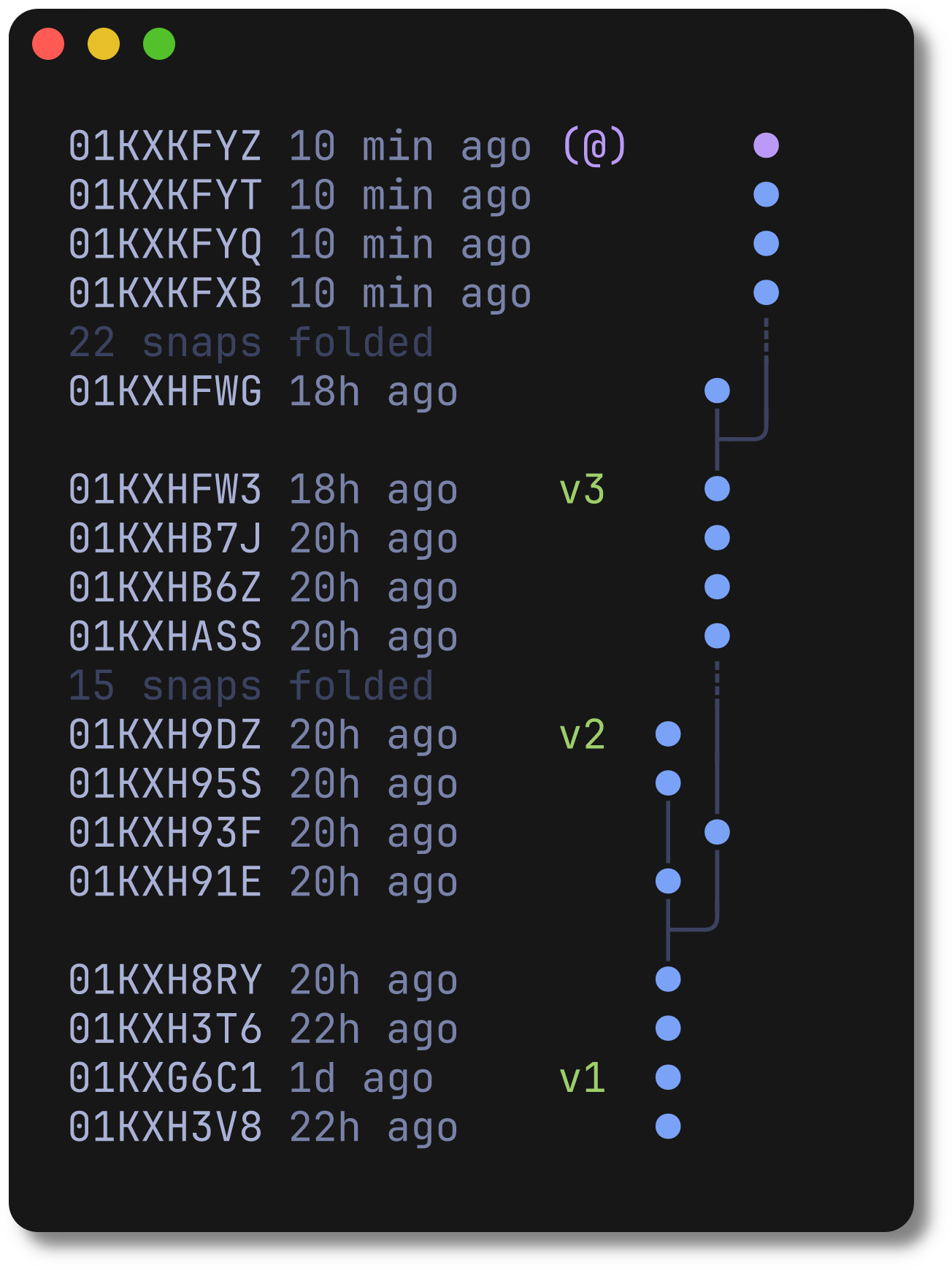
A tool that keeps project-wide history might sound like version control such as Git, but Spor isn't that. There are no commits to write, nothing to stage, no branches to manage, and no point where you decide something is worth saving: it records on its own while you're watching a project, and stops when you stop. The history builds up as a tree of snapshots you move around in freely, rather than a list of milestones you curated by hand.
Everything is automatic and local. Spor records your history as an immutable graph of snapshots as you work, storing each unique file once (deduplicated and compressed). Returning to any moment is fast, and history is only ever removed when you explicitly ask for it.
A few workflows it might fit well (we'd love your feedback)
- Creative coding: generative art, shaders, sound patches, dialing in parameters and jumping back the moment one goes nowhere.
- Design & prototyping: iterating on a layout or concept, with earlier directions always a keypress away.
- Writing: drafts that go through structural rewrites, recovering a scrapped passage without keeping fifteen file copies.
- Data & research notebooks: analysis that runs into dead ends, so you can return to the last good point and take another route.
Installation
Spor is available for Linux, macOS and Windows.
Prebuilt binaries are provided for the following platforms:
- Linux: x86-64 (amd64), arm64
- macOS: Intel (amd64), Apple Silicon (arm64)
- Windows: x86-64 (amd64), arm64
Quick-install
On linux or macOS, you can run this quick-install bash script:
curl -sSL empr.cl/get/spor | bash
Homebrew (macOS & Linux)
brew tap emprcl/tap
brew trust emprcl/tap
brew install spor
Scoop (Windows)
scoop bucket add emprcl https://github.com/emprcl/scoop-bucket
scoop install spor
Manual installation
Download the last release for your platform.
Linux & macOS
In your terminal:
# Extract files
mkdir -p spor && tar -zxvf spor_VERSION_PLATFORM.tar.gz -C spor
cd spor

# Check it runs
./spor --version

# Optionally, move it onto your PATH
sudo mv spor /usr/local/bin/
Windows
Spor's history view uses colors and box-drawing characters, so a terminal like Windows Terminal with a good monospace font renders it best.
Unzip the last windows release and, in the same directory, run:
.\spor.exe --version
Build it yourself
You'll need go 1.25 minimum. Although you should be able to build it for either linux, macOS or Windows, it has only been tested on linux.
# Native build
go build -o spor ./cmd/spor

# Cross-compile with GOOS / GOARCH, e.g.
GOOS=linux   GOARCH=arm64 go build -o spor ./cmd/spor
GOOS=darwin  GOARCH=arm64 go build -o spor ./cmd/spor
GOOS=windows GOARCH=amd64 go build -o spor.exe ./cmd/spor
Usage
Run any command inside your project directory. There is nothing to set up: the first snapshot creates Spor's store automatically, and every command below just works once you're inside a tracked project.
Walkthrough
The same session, two ways: first inside the interactive view (spor ui), then with one-shot commands. Both work on the same history and mix freely, a command run from another terminal shows up in an open spor ui within a second.
In the interactive view
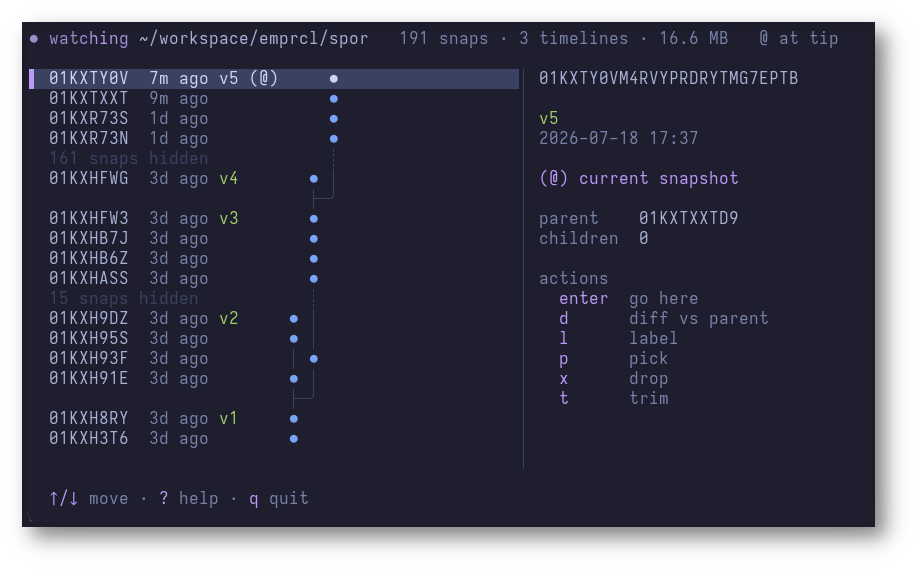
Say you're starting work on a project. cd into it and open the interactive view:
cd my-project
spor ui
It offers to watch the project; say yes and leave it open in a terminal off to the side. That's it, there's nothing to configure. Every time you save a file, Spor waits for things to settle and records a snapshot automatically, and the history tree repaints live as snapshots land, with @ marking where you are and a side panel detailing the selected snapshot.
You try something that seems worth being able to get back to easily later, so you name it: press l, type before-refactor, and hit enter. The name now shows next to that snapshot in the tree.
You keep iterating. An hour later you've gone down a path that isn't working. Rather than manually undoing your edits, move down the tree with the arrow keys (or j/k) until you reach before-refactor, and press enter. Your files are instantly restored to exactly how they were at that point; whatever you hadn't snapshotted yet was recorded first, so nothing is lost, and you can jump back the same way. From here you just keep working: your next save starts a new timeline, and the tree shows the two side by side.
Curious what a snapshot actually changed? d opens a full-screen diff of it against the one before. Maybe there's one file from the abandoned attempt you still want, without pulling back everything else: p opens a search over that snapshot's files; pick config.yaml and only that file comes back.
If you took a wrong turn, u and r step you back and forth one snapshot at a time. And once a direction is clearly done, x permanently deletes the selected snapshot and everything after it, t throws away everything before it, f folds a run of hidden snapshots into one, and T collapses every linear run at once, keeping only your tips, branch points, and named snapshots. Destructive actions always show exactly what they'll delete and ask first.
w toggles watching, s records a snapshot by hand while not watching, ? lists every key, and q quits (watching stops with it).
From the command line
The same session again, without the interactive view. Start recording with spor watch, which does only that, streaming one line per snapshot (handy in a spare terminal or redirected to a log file), and leave it running:
cd my-project
spor watch
Everything below runs from another terminal, inside the same project. (You can also skip the watcher entirely and just run spor snap whenever you want a snapshot.)
You try something that seems worth being able to get back to easily later, so you name it:
spor label @ before-refactor
That snapshot now has a name. spor log lists it alongside the others, newest first, with @ marking where you are:
01KXNZQD5N     now before-refactor (@) ●
01KXNZQD54  2m ago                     ●
01KXNZQD4M  5m ago                     ●
You keep iterating. An hour later you've gone down a path that isn't working. Rather than manually undoing your edits, just ask Spor for the history:
spor log
01KXNZQD81     now (@)             ●
01KXNZQD6S 20m ago                 ●
01KXNZQD5N  1h ago before-refactor ●
01KXNZQD54  1h ago                 ●
01KXNZQD4M  1h ago                 ●
Every snapshot, newest first, with your named ones called out. You spot before-refactor a bit further back and jump straight to it:
spor go before-refactor
@ jumps back onto before-refactor and your files match it again:
01KXNZQD81  5m ago                     ●
01KXNZQD6S 20m ago                     ●
01KXNZQD5N  1h ago before-refactor (@) ●
01KXNZQD54  1h ago                     ●
01KXNZQD4M  1h ago                     ●
Your files are instantly restored to exactly how they were at that point; whatever you hadn't snapshotted yet was recorded first, so nothing is lost, and you can always spor go back to where you were. From here you branch off in a new direction, and spor log shows the two timelines side by side:
01KXNZQT8E     now (@)               ●
01KXNZQD81 10m ago                 ● │
01KXNZQD6S 20m ago                 ● │
                                   ├─╯
01KXNZQD5N  1h ago before-refactor ●
01KXNZQD54  1h ago                 ●
01KXNZQD4M  1h ago                 ●
Curious what you've changed since before-refactor?
spor diff before-refactor
Maybe there's one file from the abandoned attempt you still want, without pulling back everything else. Any snapshot id from spor log works as a ref:
spor pick 01KXNZQD81 config.yaml
If you took a wrong turn, spor undo (and spor redo) step you back and forth one snapshot at a time, no <ref> needed. And once a direction is clearly done, spor drop <ref> permanently deletes it and everything after it, spor trim <ref> throws away everything before a point, spor fold <a> <b> squashes a noisy run of snapshots into one, and spor thin collapses every linear run at once, keeping only your tips, branch points, and named snapshots, if you want to tidy up before sharing. If you ever want a clean slate, spor forget wipes Spor's history for the project, keeping your files exactly as they are.
That's the whole workflow: watch, work, and reach back into history whenever you need to, from inside spor ui or with the commands below. See the full command reference below, or spor --help / spor <command> --help for the same thing from your terminal.
Commands
Interactive
- spor ui: open the interactive view; it offers to watch on startup (
--watch/--browsepicks the mode and skips the offer),wtoggles watching, and every command below has a key inside it (?lists them,qquits)
Common
- spor watch: watch the project and snapshot it automatically, streaming one line per snapshot (Ctrl+C to stop)
- spor snap [-l <name>]: save one snapshot by hand, optionally naming it (only needed when nothing is watching)
- spor log: show the project history, newest first, with
@marking where you are - spor undo [n]: step back
nsnapshots (default 1); reversible withredo - spor redo [n]: step forward
nsnapshots (default 1) after anundo - spor go <ref>: jump the project back (or forward) to any snapshot
- spor pick <ref> <path>: bring back one file or directory from a past snapshot, leaving everything else alone
Naming & inspecting
- spor label <ref> <name>: name a snapshot so you can refer to it later
- spor label -d <name>: remove a label
- spor label: list every label and the snapshot it names
- spor diff <ref> [<ref>]: show what changed from
<ref>to@, or between two snapshots - spor status: project path, whether a watcher is running, history size, store size, and where
@sits
History editing (destructive, and confirms first unless -y is given)
- spor drop <ref>: permanently delete a snapshot and everything after it
- spor trim <ref>: permanently drop everything before a snapshot, keeping it and what follows
- spor fold <a> <b>: squash the run of snapshots from
atobinto one - spor thin: collapse linear runs across the whole history, keeping only tips, branch points, and named snapshots
Starting over
- spor forget: delete all of Spor's history for the project (your files are kept)
Maintenance
- spor verify: check the stored history for corruption
- spor gc: reclaim disk space from data no longer referenced by any snapshot
A <ref> can be @ (the current snapshot), @~n (n snapshots back), a duration like 2h or 3d, a snapshot id (or a short prefix of one), or a label. Run spor <command> --help for the full details and more examples.
Ignoring files
.spor/, Spor's own store, is always excluded. On top of that, a few common, high-churn or huge directories are ignored by default, so a first snapshot never sweeps them in: .git/, editor/OS temp files (*.tmp, *~, *.swp, *.swo, .DS_Store), and directories like node_modules/, build/, dist/, target/, __pycache__/, and .venv/.
To exclude anything else, add a .sporignore file at the project root, using the same syntax as .gitignore (globs, **, directory-only foo/, # comments, and ! negation). It's applied on top of the defaults, so you can re-include one with a negation, e.g. !build/ if that's where your sources actually live. .sporignore is itself tracked, like .gitignore, and Spor never creates it: it's entirely opt-in.
Design Specification
See the Design Specification for the full design and the mental model behind Spor.